The hardest part of a family trip isn't the packing. It's the dates. When the kids split time between two homes, a beach week that looks easy on paper can land right on top of the other home's weekend. So start with the nights, not the hotel.
Start with the question everyone asks
Before you look at flights, answer one thing: which nights are the kids with us? Everything else follows from that. If you book first and check later, you end up trading weekends in a hurry, or telling Grandma the trip is off.
KidNights answers that question for you. It reads your custody order and your kids' school calendar, then shows every night of the year. Blue nights are nights the kids are with you.
Plan the trip in KidNights
Open Plan a trip and follow these steps:
- Choose Who's going? Pick With the kids for a family trip.
- Tap your first night, then tap the day you come home.
- KidNights tells you right away how many of those nights work.
- Not sure where to start? Tap Find dates. It lists open weekends and whole weeks when the kids are with you.
- Tap School breaks to see breaks your kids share, like spring break or Thanksgiving week.
- When it looks right, tap Add a trip to put it on your schedule.
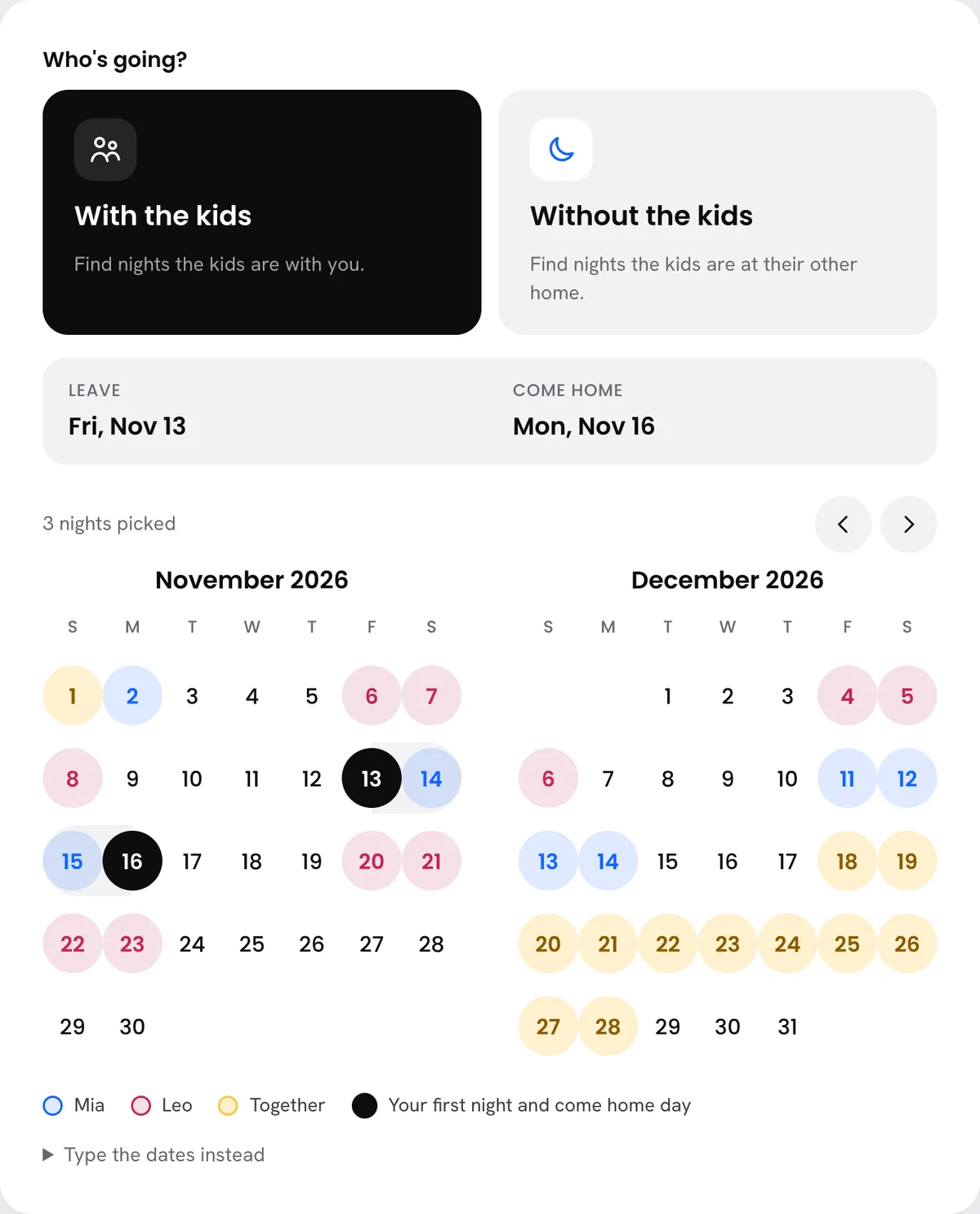 Plan a trip: pick your first night and your come home day, and KidNights counts the nights that work.
Use the long weekends
Most families can't take a full week off very often. Long weekends are where the real trips happen. Look for these first:
- Three-day school weekends. Teacher work days and Monday holidays turn a normal weekend into a short trip.
- Your holiday weekends. If you have Memorial Day or Labor Day this year, that is an extra night you didn't have to ask for.
- Your summer weeks. Summer is often when your longest stretch with the kids happens. Pick those weeks early.
Check every kid, not just one
If you have more than one kid, and especially if the kids come from different orders, the nights don't always match. One kid can be with you while another is at their other home.
Plan a trip checks all of them at once. It finds the nights when all the kids are with you, so nobody gets left out of the trip. Read more in Blended family 101.
Tell the family once
When the trip is on your schedule, it shows on your family page. Grandparents and anyone else with your family code can see it. No more group texts asking "wait, which week is the lake?"
Planning a trip without the kids? That works too. Choose Without the kids in Plan a trip, and those trips stay private to you.
If the dates don't line up
Sometimes the perfect week falls on the other home's time. You have a few choices:
- Move the trip. Find dates usually shows another week that works.
- Trade a weekend. If both homes agree, use Change schedule to trade one weekend for another. Your normal schedule stays the same underneath, and you can undo it.
- Ask early. The further ahead you plan, the easier any change is for everyone.
Key takeaways
- Pick the nights before you book anything.
- Find dates lists open weekends and whole weeks with the kids.
- School breaks shows breaks all your kids share.
- Trips with the kids show on your family page. Trips without them stay private.
Questions families ask
Can I plan a trip with only one of my kids?
Yes. Plan a trip shows each kid's nights, so you can see when one kid is with you even if the others aren't.
Will Grandma see our kid-free trips?
No. Family members only see trips with the kids. Kid-free trips stay private to you.
What if our order doesn't say much about trips?
Plan with the nights you have. If you need extra nights, agree on them first, then add them with Change schedule as Extra time.