"Do you have the kids next weekend?" If you've been asked that by your mom, your dad, your sister or your best friend, you know how often it comes up. Grandparents want to plan. They just can't see the schedule.
Why grandparents ask so much
When parents live apart, grandparents lose the easy rhythm they used to have. They don't know which weekends are yours. They don't want to plan a birthday dinner and find out the kids are gone. So they ask, every time.
The answer is to let them look it up themselves.
What your family link does
KidNights gives your family one link. Each person you share it with gets their own code. When they open the link and type their code, they see:
- When the kids are with you, in blue.
- A countdown for each kid, like "Mia is here in 3 days."
- What's coming up, including holidays and trips with the kids.
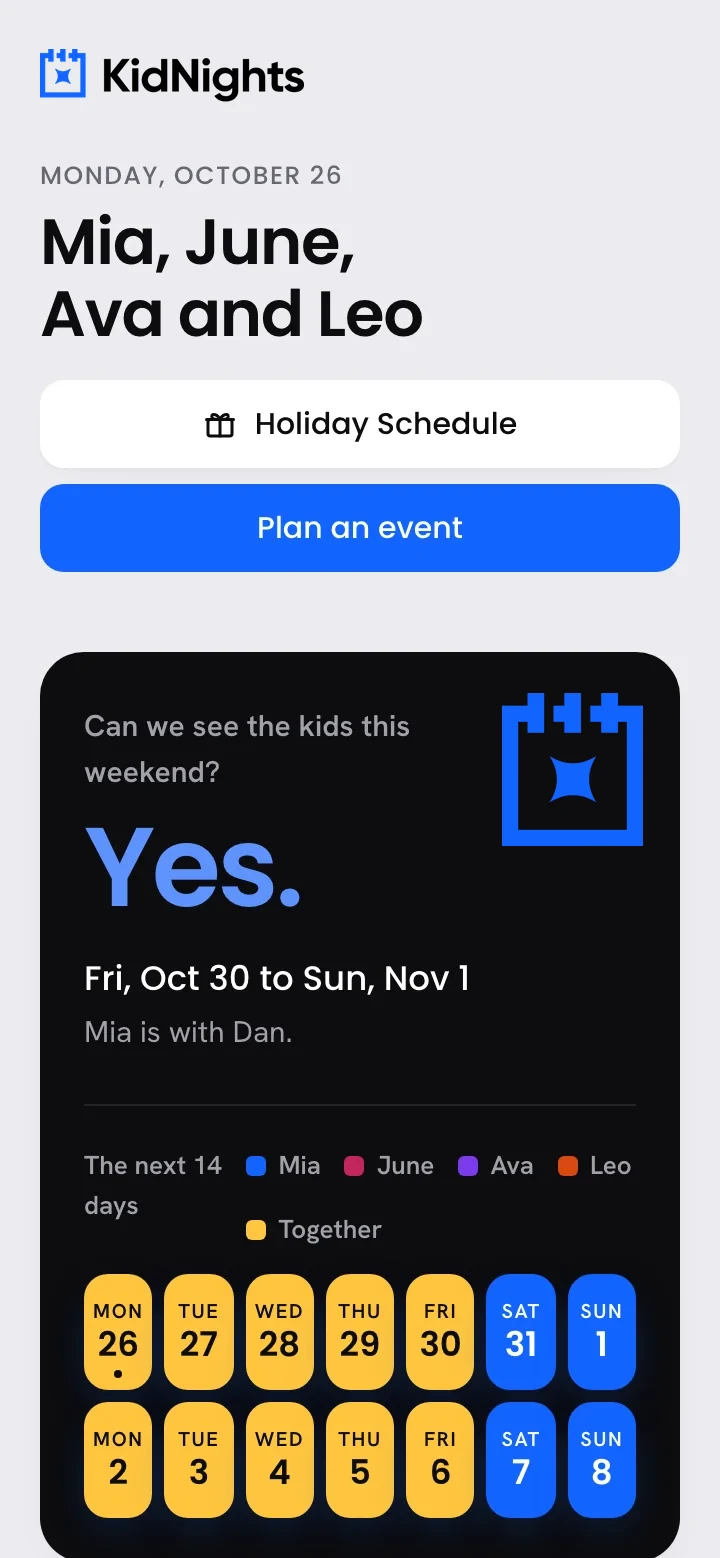 Your family page answers the question before anyone asks it.
What they never see
Your family page is about the kids' time with you, and nothing else. Family members never see:
- Your custody order or any papers.
- Your kid-free nights.
- Your trips without the kids.
Give someone a code
It takes about a minute:
- Open Share with family and tap Give someone a code.
- Type who it's for, like Grandma Linda.
- Pick their code. It needs 6 or more letters, and capitals don't matter.
- Choose when it ends: never, 30 days, 90 days or 1 year.
- Send them your family link and their code.
You can see when each person last opened your page. If you ever need to, tap Turn off on one person's code. Everyone else keeps theirs.
 Family open the link and type their code. That's it, no app and no account.
Let them suggest a visit
Grandparents can do more than look. From the family page they can find dates that work and suggest a visit. You get the request, and you confirm it. Then it's on everyone's calendar.
 When grandparents can see the dates, they can plan the visit, the trip and the sleepover themselves.
Ideas for grandparent time
Once they can see the calendar, grandparents tend to plan more. A few favorites:
- A standing dinner on the first night of each of your weekends.
- A sleepover during a long weekend, so you get a quiet night too.
- A summer week at their house, planned in the spring.
- Showing up to a game or recital that falls on your time.
Key takeaways
- A family link plus a personal code lets each family member check the kids' schedule.
- They see when the kids are with you, a countdown and what's coming up.
- They never see your papers, kid-free nights or private trips.
- They can suggest a visit, and you confirm it.
Questions families ask
Does Grandma need to download an app?
No. She opens your family link in any web browser and types her code.
Can I give my sister a code that ends after the summer?
Yes. Pick 30 days, 90 days or 1 year when you make the code. You can also turn it off any time.
What if both grandmas want access?
Give each person their own code. You can turn one off without changing anyone else's.